Smartwatch Payment Systems How They Work
Learn how smartwatch payment systems like Apple Pay and Google Pay work. Enjoy the convenience of contactless payments.
Learn how smartwatch payment systems like Apple Pay and Google Pay work. Enjoy the convenience of contactless payments.
Smartwatch Payment Systems How They Work
Understanding Contactless Payments on Your Wrist
Smartwatches have evolved beyond just telling time and tracking fitness. One of their most convenient features is the ability to make payments directly from your wrist. This technology, known as contactless payment, leverages Near Field Communication (NFC) to facilitate secure transactions without needing your physical wallet or even your smartphone. Imagine leaving your house for a quick run, grabbing a coffee on the way back, and paying for it with a simple tap of your watch. That's the power and convenience of smartwatch payment systems.
The core technology behind these payments is NFC. NFC is a short-range wireless technology that allows two devices to communicate when they are brought within a few centimeters of each other. In the context of payments, your smartwatch acts as a digital wallet, securely storing your credit or debit card information. When you tap your watch on a compatible payment terminal, the NFC chip in your watch transmits your encrypted payment details to the terminal, completing the transaction. It's fast, secure, and incredibly convenient.
How Smartwatch Payment Systems Function A Deep Dive into NFC Technology
Let's break down the mechanics of how smartwatch payment systems work. When you set up a payment system on your smartwatch, you typically add your credit or debit card details through a dedicated app on your smartphone (e.g., Apple Wallet for Apple Watch, Google Wallet for Wear OS devices, or Samsung Pay for Galaxy Watches). This process involves verifying your card with your bank, which tokenizes your card information. Tokenization replaces your actual card number with a unique, encrypted digital token. This token is then stored securely on your smartwatch.
When you initiate a payment at a terminal, your smartwatch doesn't transmit your actual card number. Instead, it sends this unique token along with a dynamic cryptogram (a one-time code) to the payment terminal. The terminal then sends this information to your bank's payment network. Because only the token and cryptogram are transmitted, even if intercepted, your actual card details remain safe. This layered security is a significant advantage over traditional card payments, where your full card number might be exposed.
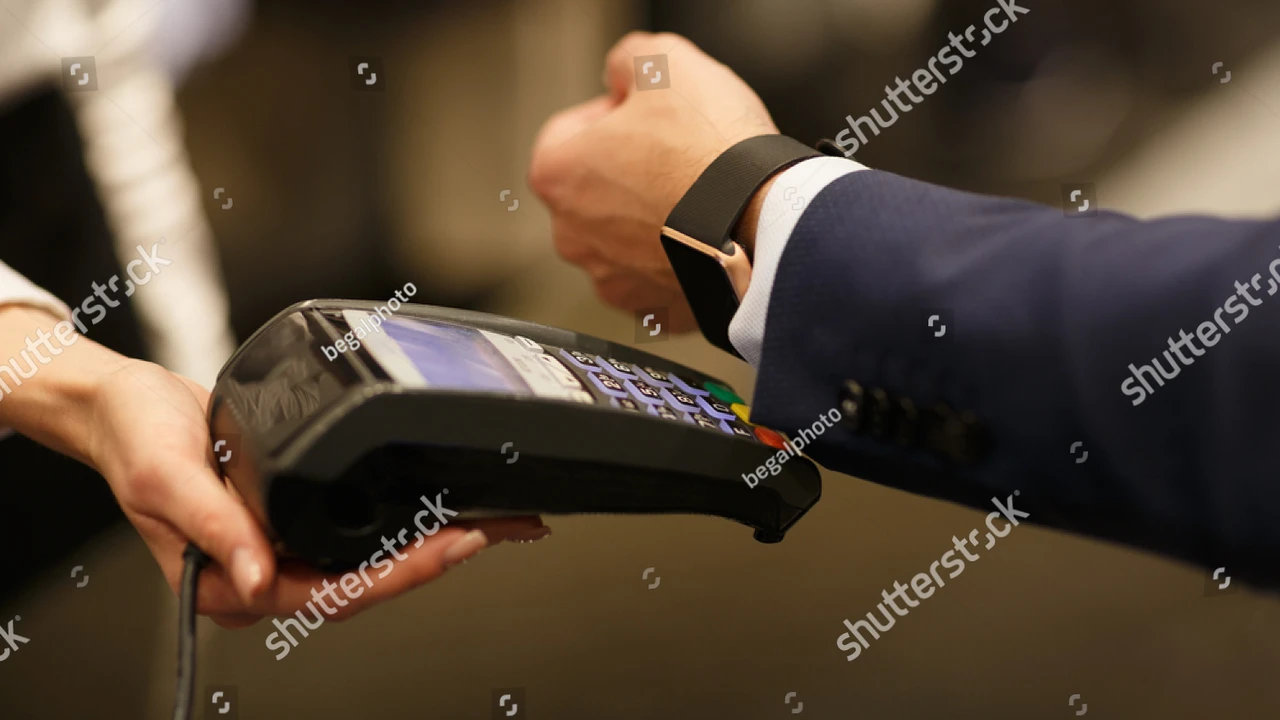
The process is remarkably quick. Once you activate the payment function on your watch (often by double-tapping a button or entering a PIN), you simply hold your watch near the contactless reader. The NFC chips communicate, the transaction is authorized, and you'll usually receive a confirmation on your watch screen. This entire process typically takes just a few seconds, making it much faster than fumbling for a card or cash.
Leading Smartwatch Payment Platforms Apple Pay Google Pay Samsung Pay
While the underlying NFC technology is similar, different smartwatch ecosystems offer their own proprietary payment platforms. The three dominant players are Apple Pay, Google Pay, and Samsung Pay. Each has its nuances in terms of setup, compatibility, and user experience.
Apple Pay Seamless Payments for Apple Watch Users
Apple Pay is arguably the most widely adopted and recognized mobile payment system globally. For Apple Watch users, setting up Apple Pay is straightforward through the Wallet app on your paired iPhone. You can add multiple credit, debit, and even loyalty cards. Once set up, double-clicking the side button on your Apple Watch brings up your default card, and you can scroll to select others. Hold your watch near the reader, and a gentle tap confirms the payment. Apple Pay is known for its robust security features, including Face ID or Touch ID authentication on the iPhone for initial setup and a required passcode on the watch if it's removed from your wrist. It's accepted at millions of locations worldwide that display the contactless payment symbol or the Apple Pay logo.
Recommended Apple Watch Models for Apple Pay:
- Apple Watch Series 9: The latest model, offering the fastest performance and brightest display, ensuring a smooth payment experience. Price: Starting around $399. Use Case: Everyday payments, quick transactions at grocery stores, cafes, and public transport.
- Apple Watch SE (2nd Gen): A more budget-friendly option that still fully supports Apple Pay. Price: Starting around $249. Use Case: Excellent for users who want core smartwatch features including payments without the premium price tag.
- Apple Watch Ultra 2: Designed for adventurers, but also offers robust Apple Pay functionality with its larger, more durable display. Price: Starting around $799. Use Case: Outdoor activities where carrying a wallet might be inconvenient, like hiking or cycling.
Google Pay Versatile Payments for Wear OS and Android Smartwatches
Google Pay (now often referred to as Google Wallet for payments) is Google's answer to mobile payments, widely available on Wear OS smartwatches and many other Android-compatible devices. To use Google Pay on your smartwatch, you'll need to download the Google Wallet app on your paired Android phone and add your cards. On your smartwatch, you typically access Google Pay by pressing a designated button or through the app drawer. You might need to enter a PIN on your watch for security before making a payment, especially for higher-value transactions. Google Pay is accepted wherever you see the Google Pay or contactless payment symbol.
Recommended Wear OS Smartwatch Models for Google Pay:
- Samsung Galaxy Watch 6 Classic: A premium Wear OS smartwatch with a classic design and excellent Google Pay integration. Price: Starting around $399. Use Case: Daily use, combining style with convenient payments, especially for Samsung phone users.
- Google Pixel Watch 2: Google's own smartwatch, offering a pure Wear OS experience and seamless Google Pay functionality. Price: Starting around $349. Use Case: Best for Pixel phone users or those who prefer a clean Android experience with integrated Google services.
- Mobvoi TicWatch Pro 5: Known for its dual-layer display and long battery life, making it a practical choice for Google Pay users. Price: Starting around $349. Use Case: Users who prioritize battery life and want reliable Google Pay access throughout the day.
Samsung Pay Secure Payments for Galaxy Watch Users
Samsung Pay is Samsung's proprietary payment system, primarily found on Samsung Galaxy Watches. What historically set Samsung Pay apart was its support for both NFC and Magnetic Secure Transmission (MST) technology, allowing it to work with older magnetic stripe card readers in addition to contactless terminals. However, newer Galaxy Watch models (like the Galaxy Watch 4 and later) have phased out MST, relying solely on NFC. Setting up Samsung Pay involves the Samsung Wallet app on your Samsung smartphone. On your Galaxy Watch, you typically long-press the back key to activate Samsung Pay. It offers robust security with fingerprint or PIN authentication.
Recommended Samsung Galaxy Watch Models for Samsung Pay:
- Samsung Galaxy Watch 6: The standard model, offering a sleek design and full Samsung Pay support. Price: Starting around $299. Use Case: Everyday payments, fitness tracking, and seamless integration with Samsung smartphones.
- Samsung Galaxy Watch 5 Pro: A more rugged and feature-rich option with excellent battery life, perfect for active users who still want payment convenience. Price: Starting around $449. Use Case: Outdoor enthusiasts, long trips where battery life and payment access are crucial.
Security Measures Protecting Your Financial Data on Smartwatches
One of the primary concerns people have about mobile payments is security. Rest assured, smartwatch payment systems are designed with multiple layers of security to protect your financial information. As mentioned, tokenization is a key component. Your actual card number is never stored on your watch or transmitted during a transaction. Instead, a unique, encrypted token is used.
Beyond tokenization, smartwatches employ several other security measures:
- Device-Specific Cryptograms: Each transaction generates a unique, one-time cryptogram, making it impossible for fraudsters to reuse intercepted data.
- Authentication: Most systems require you to authenticate before making a payment, especially for higher-value transactions. This could be a PIN on your watch, or in the case of Apple Watch, it requires a passcode if the watch is removed from your wrist.
- Secure Element: Smartwatches typically have a dedicated hardware component called a 'Secure Element' or 'Secure Enclave.' This isolated chip is designed to store sensitive data like payment tokens in a highly secure, tamper-resistant environment, separate from the main operating system.
- Encryption: All communication between your watch and the payment terminal is heavily encrypted, preventing eavesdropping.
- Remote Wipe: If your smartwatch is lost or stolen, you can remotely wipe its data, including your payment information, from your paired smartphone or a web portal.
These combined measures make smartwatch payments often more secure than using a physical credit card, where your card number and security code are visible and could be skimmed or copied.
Setting Up and Using Smartwatch Payment Systems A Step by Step Guide
While the exact steps might vary slightly depending on your smartwatch brand and model, the general process for setting up and using smartwatch payment systems is quite similar across platforms.
Initial Setup
- Ensure Compatibility: First, make sure your smartwatch has NFC capabilities and supports the desired payment platform (Apple Pay, Google Pay, Samsung Pay).
- Download the App: On your paired smartphone, download the relevant wallet app (Apple Wallet, Google Wallet, Samsung Wallet).
- Add Your Card: Open the wallet app and follow the prompts to add a new credit or debit card. You'll typically be asked to scan your card or manually enter the details.
- Verify Your Card: Your bank will likely require a verification step, which could involve receiving a text message, email, or phone call with a code.
- Sync to Watch: Once verified on your phone, the app will usually prompt you to add the card to your smartwatch. Confirm this action.
- Set Up Passcode/PIN: For security, you'll need to set up a passcode or PIN on your smartwatch. This is crucial for protecting your payment information.
Making a Payment
- Activate Payment Mode: On your smartwatch, activate the payment mode. This is usually done by double-tapping a side button (Apple Watch), long-pressing a button (Samsung Galaxy Watch), or opening the Google Pay app (Wear OS).
- Select Card (if applicable): If you have multiple cards, scroll through to select the one you wish to use.
- Authenticate (if required): For some transactions or if your watch has been off your wrist, you might need to enter your smartwatch PIN.
- Tap and Pay: Hold your smartwatch a few centimeters away from the contactless payment terminal. You'll usually hear a beep or see a confirmation message on the terminal and your watch screen when the transaction is complete.
Benefits of Smartwatch Payments Convenience Speed and Security
The advantages of using your smartwatch for payments are numerous and significantly enhance the convenience of daily transactions.
Unmatched Convenience
The most obvious benefit is convenience. Your smartwatch is always on your wrist, making it incredibly accessible. No more fumbling for your wallet or phone, especially when your hands are full or you're in a hurry. It's perfect for quick purchases at coffee shops, vending machines, or public transport. For fitness enthusiasts, it means you can go for a run or a bike ride without needing to carry anything but your watch, yet still be able to buy a drink or snack.
Blazing Fast Transactions
Contactless payments are inherently faster than traditional methods. The tap-and-go nature of smartwatch payments significantly reduces transaction times. This speed benefits both the consumer and the merchant, leading to shorter queues and a more efficient checkout process.
Enhanced Security
As detailed earlier, the security features built into smartwatch payment systems often surpass those of physical cards. Tokenization, dynamic cryptograms, and secure hardware elements provide robust protection against fraud. Even if your watch is stolen, the required authentication (PIN, passcode) makes it difficult for unauthorized users to access your payment information.
Reduced Clutter
For minimalists, smartwatch payments mean one less item to carry. You can leave your wallet at home for many errands, relying solely on your watch for payments. This is particularly appealing for those who prefer to travel light.
Limitations and Considerations Before Relying on Smartwatch Payments
While smartwatch payment systems offer many benefits, there are a few limitations and considerations to keep in mind.
Terminal Compatibility
The primary limitation is the need for a compatible contactless payment terminal. While NFC terminals are becoming increasingly common, especially in urban areas and developed countries, they are not universally available. Some smaller businesses or older payment systems might still only accept traditional card swipes or cash. Before relying solely on your smartwatch for payments, it's wise to confirm that your frequently visited merchants support contactless payments.
Battery Life Dependency
Smartwatch payment functionality relies on your watch having sufficient battery life. If your watch dies, you won't be able to make payments. While many modern smartwatches offer decent battery life, heavy usage (including GPS tracking, constant notifications, and frequent payments) can drain the battery quickly. It's always a good idea to have a backup payment method (like a physical card or your phone) just in case.
Initial Setup Complexity
For some users, the initial setup process of adding cards and verifying them can be a bit cumbersome, especially if they encounter issues with their bank's verification process. However, once set up, the daily usage is very simple.
Security Concerns (Perception vs. Reality)
Despite the robust security measures, some users may still have a psychological barrier or lingering concerns about the security of digital payments. Educating oneself about tokenization and encryption can help alleviate these fears, but it's a factor for some.
Transaction Limits
Some banks or payment systems might impose transaction limits for contactless payments without requiring a PIN, especially for higher amounts. While this is a security feature, it can sometimes be an inconvenience if you're making a large purchase.
The Future of Smartwatch Payments Beyond Just Tapping
The evolution of smartwatch payment systems is far from over. We can expect several exciting developments in the coming years.
Biometric Authentication
While some smartwatches already use PINs, future models might integrate more advanced biometric authentication directly on the watch, such as fingerprint sensors on the crown or side button, or even vein pattern recognition for enhanced security and convenience.
Integration with Digital Currencies
As cryptocurrencies and central bank digital currencies (CBDCs) gain traction, smartwatches could become a primary interface for managing and spending these digital assets, offering a seamless bridge between the physical and digital financial worlds.
Enhanced Loyalty Programs and Rewards
Expect deeper integration with loyalty programs, coupons, and personalized rewards. Your smartwatch could automatically apply discounts or collect points without you needing to present separate cards or apps.
Wearable-to-Wearable Payments
Imagine being able to send money directly from your smartwatch to another person's smartwatch. While peer-to-peer payment apps exist on phones, direct wearable-to-wearable transactions could become a reality, simplifying small transfers between friends or family.
Broader Acceptance and Global Reach
As contactless payment infrastructure continues to expand globally, smartwatches will become an even more ubiquitous payment tool, reducing the need for local currency or physical cards when traveling.
Advanced Analytics and Budgeting
Your smartwatch could provide real-time spending insights, categorize your purchases, and help you stick to a budget, all accessible directly from your wrist. This would transform smartwatches into powerful personal finance tools.
Smartwatch payment systems are a testament to how wearable technology is making our lives more convenient, efficient, and secure. By understanding how they work, their benefits, and their current limitations, you can confidently embrace this modern way of transacting and enjoy the freedom of leaving your wallet behind.
:max_bytes(150000):strip_icc()/277019-baked-pork-chops-with-cream-of-mushroom-soup-DDMFS-beauty-4x3-BG-7505-5762b731cf30447d9cbbbbbf387beafa.jpg)