Smartwatch for Kids Safety Features to Prioritize
When buying a smartwatch for kids, prioritize safety features like GPS tracking, SOS buttons, and parental controls.
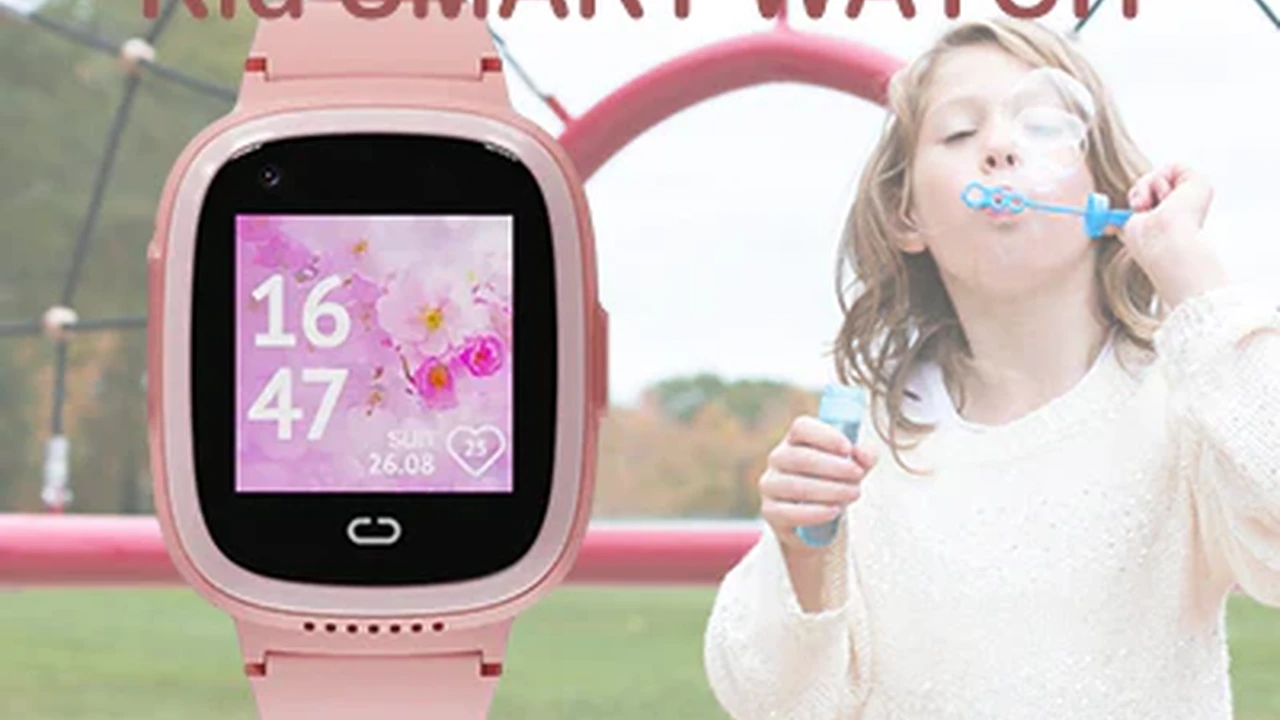
When buying a smartwatch for kids, prioritize safety features like GPS tracking, SOS buttons, and parental controls. This guide will walk you through everything you need to know to choose the safest and most suitable smartwatch for your child.
Smartwatch for Kids Safety Features to Prioritize
Why a Smartwatch for Your Child? Understanding the Need for Kids Smartwatches
In today's fast-paced world, keeping track of our children while fostering their independence can be a delicate balance. Smartwatches for kids have emerged as a popular solution, offering a blend of communication, safety, and entertainment. Unlike smartphones, which can be overwhelming and distracting for younger children, smartwatches provide a more controlled and focused experience. They allow parents to stay connected with their kids without handing over a full-fledged internet-enabled device. The primary appeal lies in their safety features, which offer peace of mind to parents, knowing they can locate their child or be alerted in an emergency. Beyond safety, these devices can also encourage responsibility, help with time management, and even promote physical activity through built-in fitness trackers. It's about finding a tool that enhances safety and communication without introducing unnecessary complexities or risks.
Essential Safety Features in Kids Smartwatches What to Look For
When it comes to a child's safety, not all smartwatches are created equal. Prioritizing specific features is crucial. Here's a breakdown of the most important safety functionalities you should look for:
GPS Tracking and Location Monitoring Real-time Child Location
This is arguably the most critical safety feature. GPS tracking allows parents to pinpoint their child's location in real-time. Look for smartwatches that offer accurate and frequent location updates. Some advanced models even provide location history, allowing you to review where your child has been throughout the day. Geofencing is another powerful tool within GPS tracking. This feature enables you to set virtual boundaries (e.g., school, home, park) and receive alerts when your child enters or leaves these designated safe zones. This is incredibly useful for ensuring your child stays within expected areas and for being notified if they deviate from their usual routine. Consider the refresh rate of the GPS; a faster refresh rate means more up-to-date location information.
SOS Button and Emergency Calling Instant Help for Kids
An SOS button is a non-negotiable feature. In an emergency, a child can press this button to instantly alert pre-programmed contacts (usually parents or guardians). The smartwatch should then automatically dial these contacts in a sequence until one answers. Some smartwatches also send the child's current location along with the SOS alert, providing crucial information to responders. This feature empowers children to call for help even if they are too young to remember phone numbers or are in a stressful situation. Test this feature regularly to ensure it's working correctly and teach your child how and when to use it responsibly.
Parental Controls and Whitelisting Managing Contacts and Apps
Robust parental controls are essential for managing how your child uses the smartwatch. This includes the ability to whitelist contacts, meaning your child can only call or receive calls from numbers you've approved. This prevents unwanted communication from strangers. Look for features that allow you to set 'do not disturb' times, such as during school hours, to minimize distractions. Some smartwatches also offer app management, allowing parents to control which applications their child can access. This ensures they are not exposed to inappropriate content or games. The more granular the control, the better, giving you peace of mind about your child's digital interactions.
Two-Way Communication Calling and Messaging for Kids
While not strictly a safety feature, two-way communication is vital for staying connected. This allows your child to call you and for you to call them. Many smartwatches also support voice messages or pre-set text messages, which can be easier for younger children to use than typing. Ensure the call quality is clear and reliable. This feature is crucial for daily check-ins, coordinating pickups, or simply reassuring your child. It bridges the communication gap without the complexities of a smartphone.
Remote Monitoring and Listening Discreet Child Supervision
Some smartwatches offer a remote monitoring or 'silent listening' feature. This allows parents to discreetly listen to the child's surroundings through the smartwatch's microphone. While this feature can be controversial, some parents find it useful for checking in on their child's environment, especially if they are concerned about bullying or other issues. It's important to use this feature responsibly and consider the ethical implications. Always check local regulations regarding such monitoring features.
Durability and Water Resistance Smartwatches Built for Kids
Kids are active, and their devices need to withstand rough play. Look for smartwatches with durable materials, such as reinforced screens and sturdy straps. Water resistance is also a significant factor. An IP67 or IP68 rating means the watch can withstand splashes, rain, and even brief immersion, making it suitable for everyday use and accidental spills. This prevents damage and ensures the watch remains functional when your child needs it most.
Top Smartwatch Recommendations for Kids Focusing on Safety
Here are a few highly-rated smartwatches that prioritize safety features, along with their typical price ranges and ideal use cases:
1. Xplora X5 Play The All-Rounder for Active Kids
Price Range: $150 - $200 USD
The Xplora X5 Play is a popular choice for good reason. It offers a comprehensive suite of safety features, making it an excellent all-rounder. It boasts accurate GPS tracking with geofencing capabilities, allowing parents to set safe zones and receive alerts. The SOS button is prominent and easy for kids to use, instantly notifying pre-selected contacts. Two-way communication is clear, and parents can manage contacts through the app. It also includes a school mode to minimize distractions during class. The X5 Play is durable and water-resistant (IP68), making it suitable for active kids. It supports 4G LTE for reliable connectivity, meaning your child can make and receive calls even when away from Wi-Fi. It also has a step counter to encourage activity. The companion app for parents is intuitive and provides a clear overview of the child's location and activity. This watch is ideal for parents who want a robust, reliable, and feature-rich safety device for their child, suitable for ages 5-12.
2. TickTalk 4 Advanced Features for Older Kids
Price Range: $200 - $250 USD
The TickTalk 4 is a premium option that offers advanced features, making it suitable for slightly older children (ages 7-14) who might appreciate more functionality while still prioritizing safety. It features precise GPS tracking, an SOS button, and secure two-way communication. What sets it apart are its video calling capabilities, allowing for face-to-face communication with approved contacts. It also includes a 'Do Not Disturb' mode for school, a step tracker, and a 5MP camera for photos and videos. The parental control app is extensive, allowing for contact whitelisting, app management, and even remote listening (with parental consent). It's built with durability in mind and is IP67 water-resistant. The TickTalk 4 requires a separate SIM card for cellular connectivity. This watch is perfect for parents looking for a more feature-rich smartwatch that still maintains strong safety protocols, offering a bridge between a basic kids' watch and a full smartphone.
3. Gabb Watch 3 Simplicity and Safety First
Price Range: $150 - $200 USD (plus subscription)
The Gabb Watch 3 is designed with simplicity and safety as its core principles. It's specifically built to be a safe first phone for kids, focusing on essential communication and tracking without internet access, social media, or games. It offers reliable GPS tracking, an SOS button, and two-way calling with a pre-approved contact list. Parents manage all settings and contacts through the Gabb app. The watch is durable and splash-proof. Its main selling point is its strict adherence to safety by eliminating potential distractions and dangers associated with internet connectivity. This makes it an excellent choice for younger children (ages 6-11) or parents who want absolute control over their child's device usage. It requires a Gabb Wireless subscription plan, which covers the cellular service.
4. Verizon GizmoWatch 3 Reliable Carrier Integration
Price Range: $100 - $150 USD (plus subscription)
The Verizon GizmoWatch 3 is a solid option for Verizon customers, offering seamless integration with their existing mobile plan. It provides accurate GPS tracking, an SOS button, and two-way calling with up to 20 approved contacts. Parents can set up 'safe zones' and receive alerts when their child enters or leaves them. It also includes a step tracker and a 'school mode' to prevent distractions. The watch is durable and water-resistant (IPX7). Its strength lies in its reliable connectivity through Verizon's network and its user-friendly interface for both kids and parents. This watch is ideal for parents already on the Verizon network who want a straightforward, reliable, and safe communication device for their child, typically for ages 4-11.
5. imoo Watch Phone Z6 Dual Camera for Video Calls
Price Range: $200 - $280 USD
The imoo Watch Phone Z6 stands out with its unique dual-camera flip design, enabling both front-facing and world-facing video calls. This feature is great for kids who want to share their surroundings with parents. It offers precise GPS tracking, an SOS button, and two-way communication. Parents can control contacts, set 'class mode' for school, and monitor activity. It's built with robust materials and is IPX8 water-resistant, making it highly durable. The Z6 supports 4G LTE for reliable connectivity. While it's on the higher end of the price spectrum, its video calling and robust build quality make it a compelling option for parents looking for advanced communication features alongside strong safety protocols, suitable for ages 6-12.
Comparing Kids Smartwatches Key Differentiators
When choosing between these options, consider the following:
- Connectivity: Do you need 4G LTE for calls and tracking anywhere, or is Wi-Fi/Bluetooth sufficient for your use case? 4G models require a separate SIM card and monthly plan.
- Battery Life: How long does the watch last on a single charge? Longer battery life means less frequent charging and more reliability.
- Screen Type and Size: Is the screen clear and easy for your child to read? Is it durable enough to withstand drops and scratches?
- Ease of Use for Child: Is the interface intuitive for your child's age group? Can they easily make calls or press the SOS button?
- Parent App Features: How comprehensive and user-friendly is the companion app for parents? Does it offer all the controls you need?
- Additional Features: Do you want a camera, video calls, fitness tracking, or games? Balance these with the primary safety objective.
- Price vs. Subscription: Consider the upfront cost of the watch versus ongoing monthly subscription fees for cellular service.
Setting Up and Using Your Child's Smartwatch Best Practices
Once you've chosen a smartwatch, proper setup and ongoing management are key to maximizing its safety benefits:
Initial Setup and App Configuration Getting Started Safely
Carefully follow the manufacturer's instructions for initial setup. This usually involves downloading the companion app on your smartphone, pairing the watch, and setting up the cellular plan if applicable. Take your time to configure all parental control settings, including whitelisting contacts, setting safe zones for geofencing, and establishing 'do not disturb' times. Ensure all emergency contacts are correctly entered for the SOS function. Test the GPS tracking and communication features to confirm they are working as expected before your child starts using the watch.
Teaching Your Child Smartwatch Responsibility and Usage
It's crucial to sit down with your child and explain how to use their new smartwatch. Teach them:
- When and how to use the SOS button: Emphasize that it's for emergencies only.
- Who they can call and who can call them: Reinforce the concept of approved contacts.
- How to answer and make calls: Practice with them.
- The importance of keeping the watch charged: Explain that it's their lifeline.
- Caring for the watch: Teach them to be responsible for their device.
Discuss the purpose of the watch – that it's for their safety and for staying connected, not just a toy. Set clear boundaries for its use, especially regarding school hours or bedtime.
Regular Monitoring and Updates Keeping Your Child Safe
Regularly check the companion app to monitor your child's location, review call logs, and ensure they are using the watch appropriately. Keep the smartwatch's software updated to ensure you have the latest features, bug fixes, and security patches. Periodically review your geofence settings and approved contact list as your child's routine or social circle changes. Open communication with your child about their smartwatch use is also vital; encourage them to come to you with any questions or concerns they might have.
Beyond Safety Additional Benefits of Kids Smartwatches
While safety is paramount, kids' smartwatches offer other advantages:
Encouraging Physical Activity Fitness Tracking for Kids
Many kids' smartwatches include basic fitness tracking features like step counters. This can be a fun way to encourage children to be more active and meet daily step goals. Some even have playful animations or rewards for reaching milestones, turning physical activity into a game. It's a gentle introduction to health and wellness tracking without the intensity of adult fitness trackers.
Developing Responsibility and Time Management Skills
Having their own device can teach children responsibility. They learn to keep it charged, take care of it, and use it appropriately. Features like alarms and timers can help them with time management, reminding them of chores, homework, or when it's time to leave for an activity. It's a small step towards greater independence.
A Stepping Stone to Smartphones Gradual Tech Introduction
For many parents, a kids' smartwatch serves as an excellent stepping stone before introducing a full smartphone. It allows children to get accustomed to having a personal communication device, understanding its purpose, and learning digital etiquette in a controlled environment. This gradual introduction can help them develop healthy tech habits before they are exposed to the broader internet and social media aspects of a smartphone.
Potential Concerns and How to Address Them
While beneficial, kids' smartwatches aren't without potential drawbacks:
Privacy Concerns Data Security and Location Tracking
Any device that tracks location and collects data raises privacy questions. Choose reputable brands that clearly outline their data privacy policies. Understand how your child's data is collected, stored, and used. Ensure the company uses secure encryption for communication and location data. Discuss with your child that their location is being tracked for their safety, fostering trust rather than resentment.
Distraction in School Minimizing Classroom Interruptions
Smartwatches can be a distraction in the classroom. Utilize the 'school mode' or 'do not disturb' features to silence notifications and restrict calls during school hours. Communicate with your child's school about their smartwatch and ensure it aligns with school policies. Teach your child that the watch is for emergencies or after-school communication, not for playing games or chatting during class.
Cost and Ongoing Fees Understanding the Investment
Beyond the initial purchase price, many kids' smartwatches require a monthly cellular subscription for full functionality (calls, real-time GPS). Factor these ongoing costs into your budget. Compare different carrier plans and watch bundles to find the most cost-effective solution for your family's needs. Sometimes, a slightly more expensive watch with a cheaper plan might be more economical in the long run.
The Future of Kids Smartwatches Emerging Trends
The kids' smartwatch market is constantly evolving. We can expect to see:
- Enhanced AI and Machine Learning: More sophisticated algorithms for better location accuracy, anomaly detection (e.g., unusual routes), and personalized safety alerts.
- Improved Health Monitoring: While not as advanced as adult smartwatches, future kids' watches might incorporate more basic health metrics like temperature or even simple heart rate monitoring, always with a focus on safety and parental information.
- Greater Integration with Smart Home Ecosystems: Allowing kids to interact with smart home devices (e.g., turning on lights) in a controlled manner.
- Sustainable Materials and Design: As environmental awareness grows, more brands might focus on eco-friendly materials and repairability.
- Educational Content: Integration of more educational games or learning modules to make the watch a tool for both safety and development.
Ultimately, a kids' smartwatch is a powerful tool for parental peace of mind and child safety. By prioritizing key features like GPS tracking, SOS buttons, and robust parental controls, and by choosing a reputable brand, you can provide your child with a device that keeps them connected and safe, while also fostering their independence and responsibility in a controlled digital environment. Remember to involve your child in the process, teach them responsible usage, and maintain open communication about their device.
:max_bytes(150000):strip_icc()/277019-baked-pork-chops-with-cream-of-mushroom-soup-DDMFS-beauty-4x3-BG-7505-5762b731cf30447d9cbbbbbf387beafa.jpg)